What kind of digital colleague or smart app would you need?
If you were allowed to think freely, what would a digital colleague or a smart tool help you with? With ADA, it becomes a reality.
Here are three examples of what ADA can do.
Digital AI colleagues are now becoming a reality for more companies. These colleagues are experts in your business and work directly within your systems—from assignment to completion.
ADA is the AI platform that makes this possible. Upheads helps you harness the power of AI securely and create entirely new opportunities for your business—without having to build your own AI organization.
Contact us
Meet Patrik and Saeid – two of our specialists behind ADA
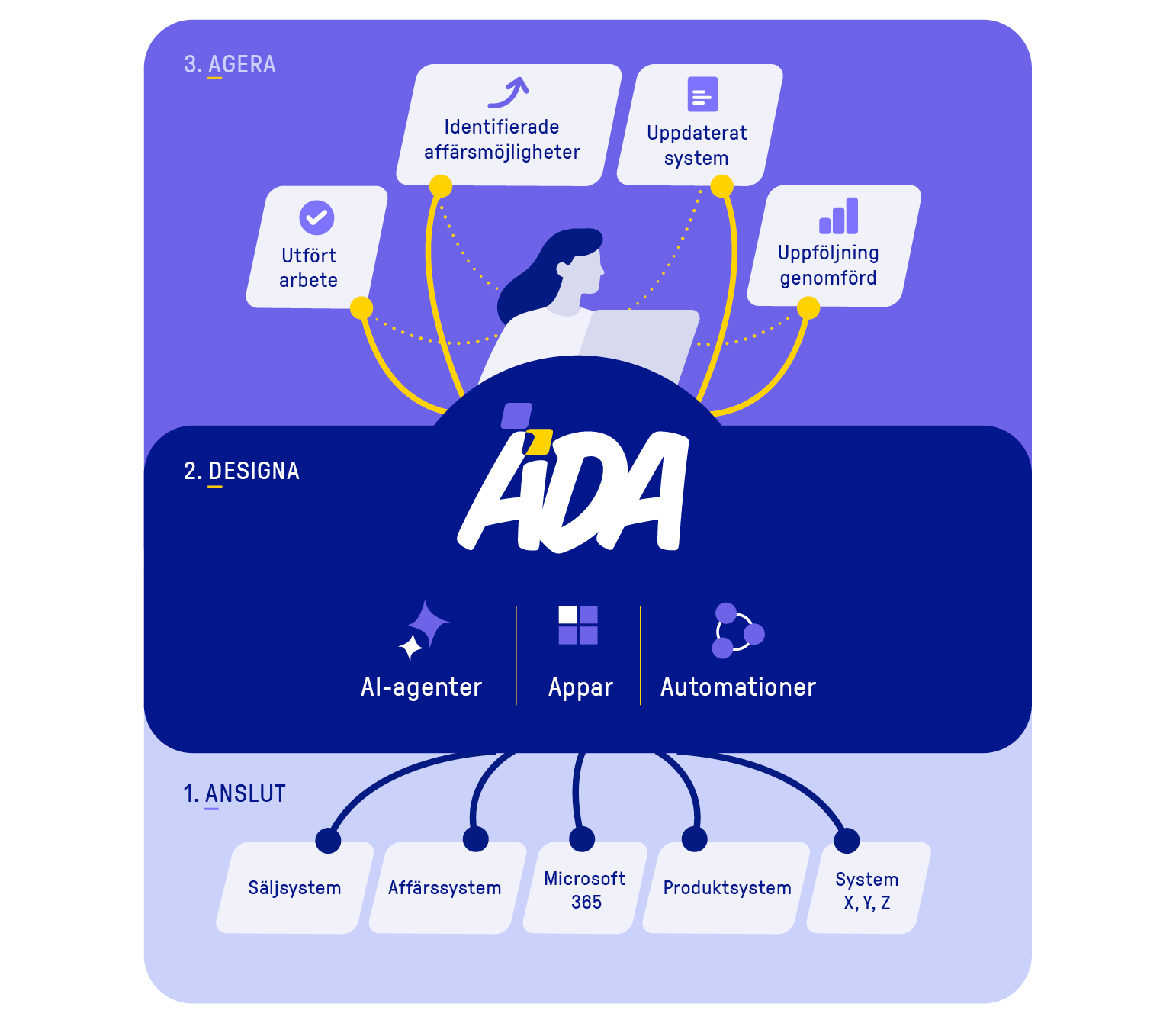
ADA integrates with your existing systems, data, and knowledge to create a layer of intelligence across your business. Here, AI agents, apps, and workflows are designed based on your needs and can operate across system and team boundaries with an understanding of the entire business.
If you were allowed to think freely, what would a digital colleague or a smart tool help you with? With ADA, it becomes a reality.
Here are three examples of what ADA can do.
A delayed delivery or a loss of trust? The Customer Strategist helps you identify when a customer relationship needs extra attention and prioritize the right course of action—without having to sift through the customer’s history yourself.
Long commitment periods or unexpected obligations? Avtalshjälpen helps you identify risks before signing and prepare for negotiations, while reducing the time spent on manual reviews.
It's the same routine every month. Receipts are missing, timesheets are late, and someone has to send a reminder—again. Let a digital colleague handle the follow-up.
33%
of employees who use AI have uploaded sensitive data to unauthorized tools
60%
of companies derive little or no tangible business benefit from their use of AI
140%
Higher productivity is observed in companies with leading AI-driven processes
Take advantage of AI without building a large team of specialists. Start with a clear need and track the benefits for your business.
ADA connects to the systems and data you already use. We start from your work processes and connect what is needed for the task.
ADA makes AI a shared capability in your work processes. Agents and automations are given clear tasks, responsibilities, and handoffs, so that the benefit becomes part of how teams work every day.
Add more agents, apps, and workflows as your needs grow. Reuse integrations and components that are already in place.
You don't have to handle the AI work on your own. Upheads will help you identify the right use case, build the solution, and take care of operations and further development.
You own your data and decide what the agents can access and do. ADA is built on Microsoft Azure, with defined permissions, logging, and approvals where needed.
An AI agent is a software-based capability that uses AI, information, and tools to solve tasks based on a defined mission. In a company, for example, it can analyze customer needs, review contracts, or assess the next steps in a case.
In Motherbrain, specialized agents can use information from multiple connected systems and collaborate with other agents, people, and automated systems. These are what we call digital colleagues.
An AI assistant typically helps a user through direct dialogue or within an application. An AI agent, on the other hand, can be given a task and work through multiple steps using available tools. The terms overlap, and the capabilities depend on how the solution is built.
Automations carry out defined steps, such as updating a system or sending a notification. Motherbrain combines AI’s ability to interpret, analyze, and make recommendations with automations that carry out concrete actions within business processes.
Start with a specific business process where there is a clear need and an outcome to track. This could involve improving the basis for decision-making prior to a transaction, reviewing contracts, or handling customer issues.
Upheads helps you identify the information, data, and systems you need, design the solution, and test it together with you. Once the solution is up and running in your organization, additional agents and workflows can be built on the same platform.
AI can assist in processes that require information to be interpreted, synthesized, and used to determine the next step. Examples include sales, contract review, financial monitoring, and customer support.
A solution in Motherbrain can analyze a customer’s situation, recommend a course of action, and—once approved—initiate a workflow that carries out the next step. The tasks that are best suited depend on your needs, the available data, and the ability to follow up on the results.
Yes, Motherbrain can be integrated with systems such as CRM, ERP, Microsoft 365, databases, and other business systems. These integrations make it possible to both retrieve information and, where permitted and technically feasible, write information or initiate workflows.
The features that can be used depend on each system’s integration capabilities and access permissions. Upheads will review the requirements with you. You simply need to connect the systems and data required for the specific solution.
You don’t need to know how to code yourself to have a solution developed by Upheads. We’ll help you with the platform, the integrations, and the agents, apps, and automations included in the project.
You contribute your knowledge of the business, access to the right information, and participation in the design and testing phases. Responsibility for operations, prioritization, and ongoing development is determined through your collaboration with Upheads.
Access is defined for each solution. Users, agents, and automations should only be able to access the information and functions needed to perform their tasks. Certain actions may require human approval, and relevant activities are logged for traceability.
Motherbrain is built on Microsoft Azure and uses Microsoft Entra ID for identity and authentication wherever possible. Background agents use separate technical identities with defined permissions. Data management is configured based on the selected architecture and your requirements.
The cost depends on the scope of the solution, the integrations required, and how responsibility for operations and development is allocated. Implementation and development must therefore be assessed based on your specific use case.
In addition to the fixed service fee, there are costs for licenses and technical resources, such as Azure services, AI model token usage, and storage. Upheads helps you develop a plan based on your needs and circumstances.
Curious about how ADA can work for your business? Get in touch, and we'll tell you more.
You can also call 040-626 75 00, Monday-Friday 08-17, or send an e-mail to kontakt@upheads.se.