Recommended structure in Teams
Chat, channels, files, and meetings—Microsoft Teams is where everyday work actually happens.
Yet many people feel that Teams can seem like an office without a floor plan: Where should I post? Where are the files? And is this meant for everyone? Or just for me?
When everyone uses Teams in their own way, things quickly get… messy.
A clear structure provides a better overview, smoother collaboration, and fewer instances of “I’ll just send an email instead.”
There are many ways to organize Teams.
The model we describe here is our recommended "best practice," which we also recommend that all our customers follow.

Organizational teams – the foundation of our Teams environment
Organizational teams are the teams that reflect our structure and affiliations. They rarely change and are used for communications that affect many people.
For us, this includes, for example:
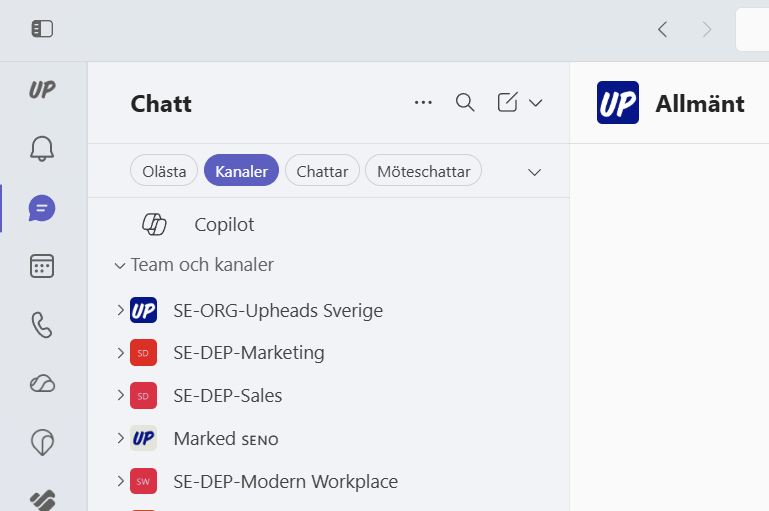
- SE-ORG-Upheads Sweden
- SE Office Malmö
These teams are primarily used for:
- General Information
- General communication
To function properly, they need:
- Clear ownership
- A well-designed channel structure
- A clear purpose (not to try to do everything)
The department teams are where the day-to-day work takes place
The next level in our structure is the department team, for example:
- SE-DEP-Marketing
- SE-DEP-Sales
- SE-DEP-Modern Workplace
This is where the day-to-day work within each department takes place.
These teams are more operational and are used for collaboration within the team. As a result, they have a more flexible structure than organizational teams.
Projects and Initiatives – Our “Dynamic” Structure
Just as in the recommended model, we need teams that can adapt to work that changes over time.
For example, here at our company:
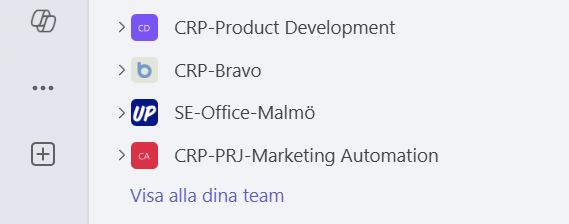
- CRP-PRJ-Marketing Automation
- CRP Product Development
- CRP-Bravo
These correspond to what the model refers to as dynamic teams—teams that are formed as needed, have a clear purpose, and a limited lifespan.
To prevent them from causing a mess, it is important to:
- Each team has a designated owner
- There is a defined purpose
- The team can be archived once the work is complete
Here’s how we’re improving the structure—without starting over
Instead of tearing everything down, we can build on what we already have.
1. Clarify the purpose of each team
Every team should be able to answer the question:
Why do we exist?
- Organization?
- Department?
- Project?
If the answer is unclear, it needs to be clarified.
2. Use a naming convention more consistently
Lay a solid foundation, for example:
- ORG = organization
- DEP = department
- PRJ / CRP = Projects and Initiatives
The next step is to use this consistently and avoid mixing things up, which creates uncertainty
3. Determine how new teams are formed
To prevent Teams from growing uncontrollably, new teams should not be created freely.
A simple process ensures:
- The Right Name
- The right structure
- Clear ownership
This reduces the risk of duplication of effort and confusion.
4. Create a clearer channel structure
Channels form the very structure of the team. A well-organized channel structure makes it easier to find what you're looking for and follow discussions.
Basic principles:
- One channel = one clear topic
- Avoid “Miscellaneous” channels
- Use a similar structure across multiple teams
Example:
- Must-know
- Good to know
- Meetings
- Work / Delivery
- Questions & Support
5. Clean up as you go
It's easy to create new teams, but harder to delete them.
Therefore, we should:
- Archive completed projects
- Remove inactive teams
- Merge where there is overlap
Small adjustments make a big difference over time.
6. Use the right channel for the right communication
Much of the noise isn't about structure, but about behavior.
Think of it this way:
- Chat → Quick Questions
- Channels → Information more people need
- Email → External Communication
When everyone does the same thing, it becomes clearer for everyone.
Summary
A good Teams structure isn’t about starting from scratch.
It’s about bringing clarity to what we already have.
By:
- Understand our different types of teams
- Use a common logic
- Organize your channels smartly
- And clean up where necessary
…we’ll create a Teams environment that actually supports our work.
Less noise. Better collaboration. A simpler workday.